
Turret Clicks Explained: Click Value & Adjustment Range
When you start dialing a rifle scope, two specs matter more than many new shooters realize: click value and adjustment range.
Whether you are zeroing your rifle at the range, correcting wind drift, or stretching your shots farther downrange, every turret click changes where your bullet lands. The better you understand how those clicks work, the easier it becomes to make clean, confident, and repeatable adjustments.
This guide breaks down how scope click value works, how MOA and MIL systems differ, why adjustment range matters, and how to calculate the number of clicks needed for real shooting corrections.
1. What Is Scope Click Value?
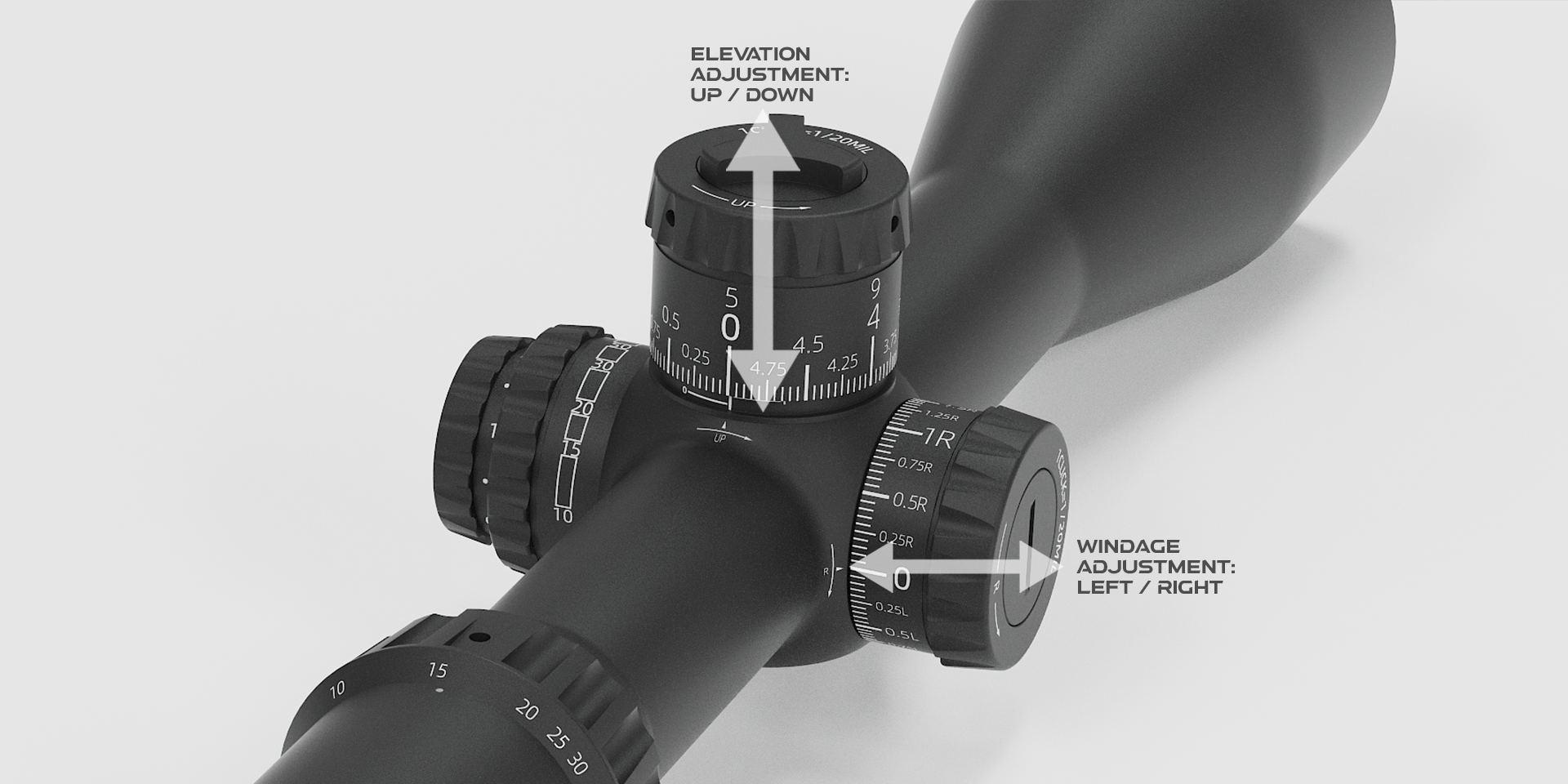
Scope click value is the amount of angular adjustment made by one click of the turret. In simple terms, it tells you how far your point of impact moves every time you rotate the elevation turret or windage turret by one click.
Most rifle scopes use one of two adjustment systems:
-
MOA, or Minute of Angle
-
MIL, also called MRAD or Milliradian
Both are angular systems, which means their real-world movement grows as distance increases. A small adjustment at 100 yards becomes a much larger shift at 500 yards or 1,000 yards.
1.1 MOA Scope Adjustments
MOA, short for Minute of Angle, is a classic angular measurement system widely used in American hunting, target shooting, and traditional rifle setups.
In geometry:
-
1 degree = 60 minutes
-
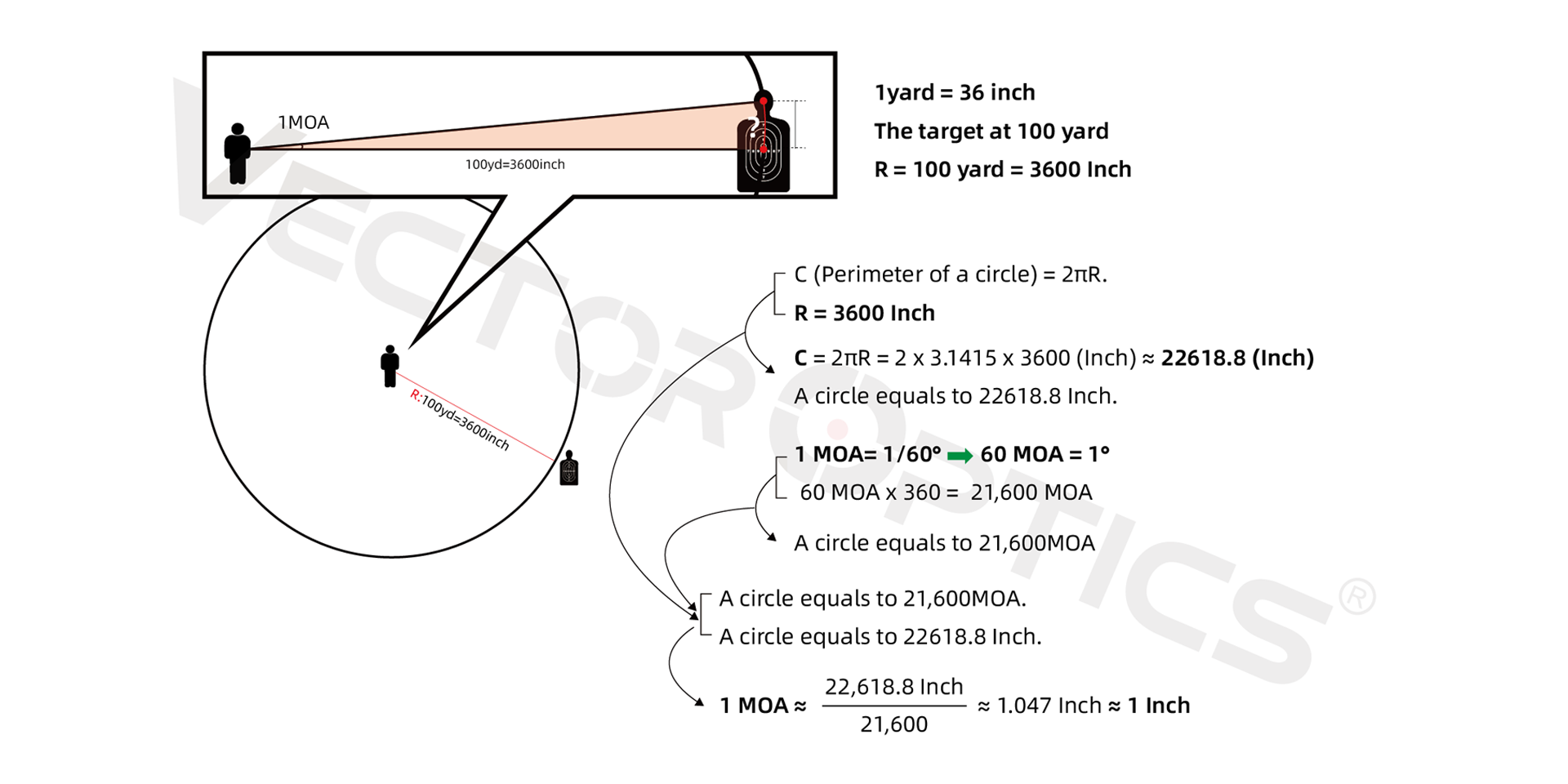
1 MOA = 1/60 degree
Because MOA is such a tiny angle, it works perfectly for rifle scope adjustments where even a small shift can change the bullet’s point of impact.
In real shooting terms:
-
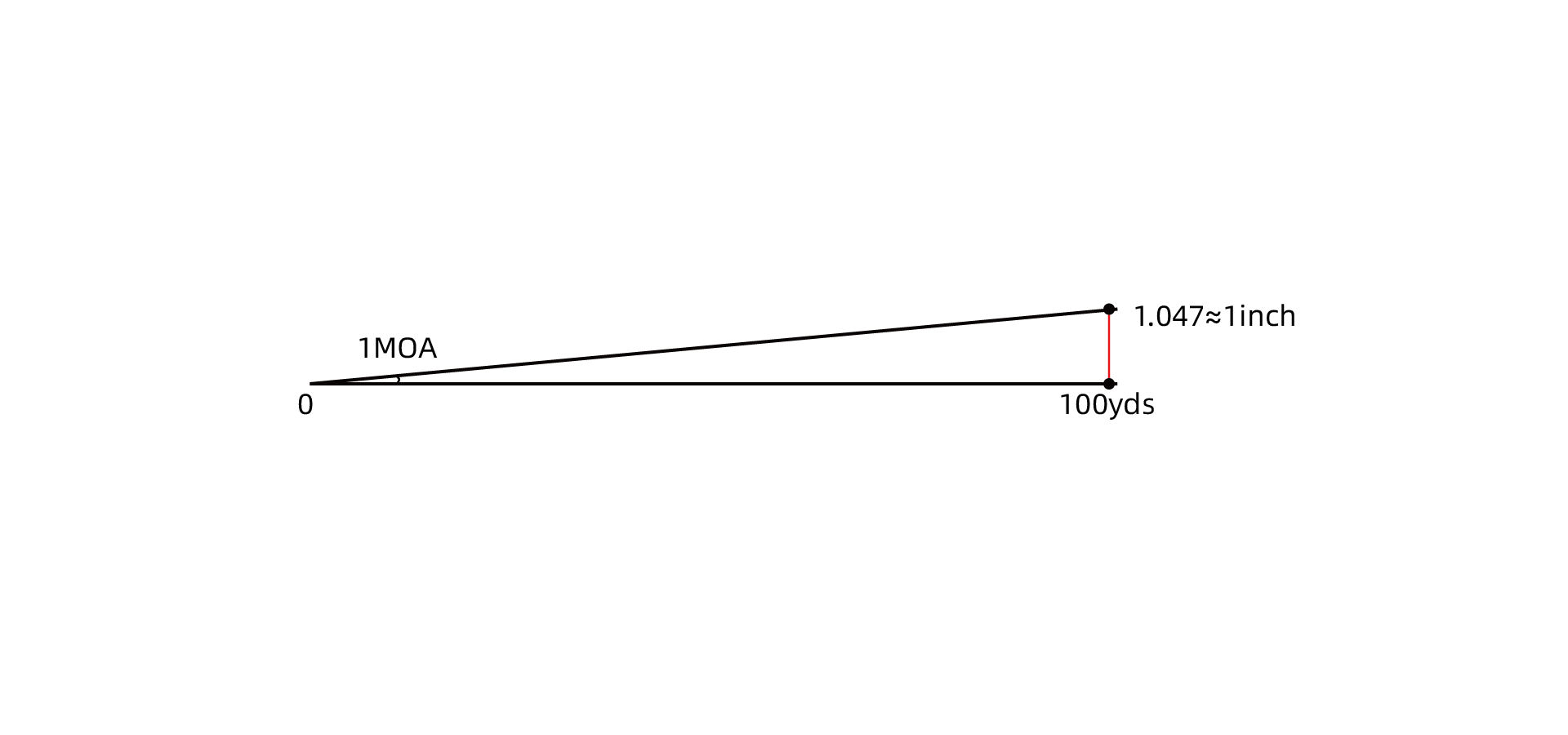
At 100 yards, 1 MOA ≈ 1.047 inches
For fast field math, most shooters round this to:
-
1 MOA ≈ 1 inch at 100 yards
That shortcut makes MOA easy to use when you need quick corrections at the range.
For example, if your scope has a 1/4 MOA click value, each click moves the point of impact by about 0.26 inches at 100 yards.
Common MOA click values include:
-
1/8 MOA
-
1/4 MOA
-
1/2 MOA
Among these, 1/4 MOA per click is the most common. It gives shooters a useful mix of precision and speed. You can make accurate corrections without spinning the turret forever, and you are less likely to over-adjust during fast target changes.
Since MOA is angular, the movement increases with range. A 1 MOA adjustment is roughly 1 inch at 100 yards, 2 inches at 200 yards, 5 inches at 500 yards, and so on. That is why understanding MOA is so important when dialing rifle scope elevation adjustment for longer shots. Click here to learn more about MOA in detail.
1.2 MIL Scope Adjustments
MIL, or Milliradian, is another angular measurement system used on many modern rifle scopes. It is especially popular in tactical shooting, long-range shooting, and precision rifle setups because the math is clean and easy to scale.
Basic MIL values:
-
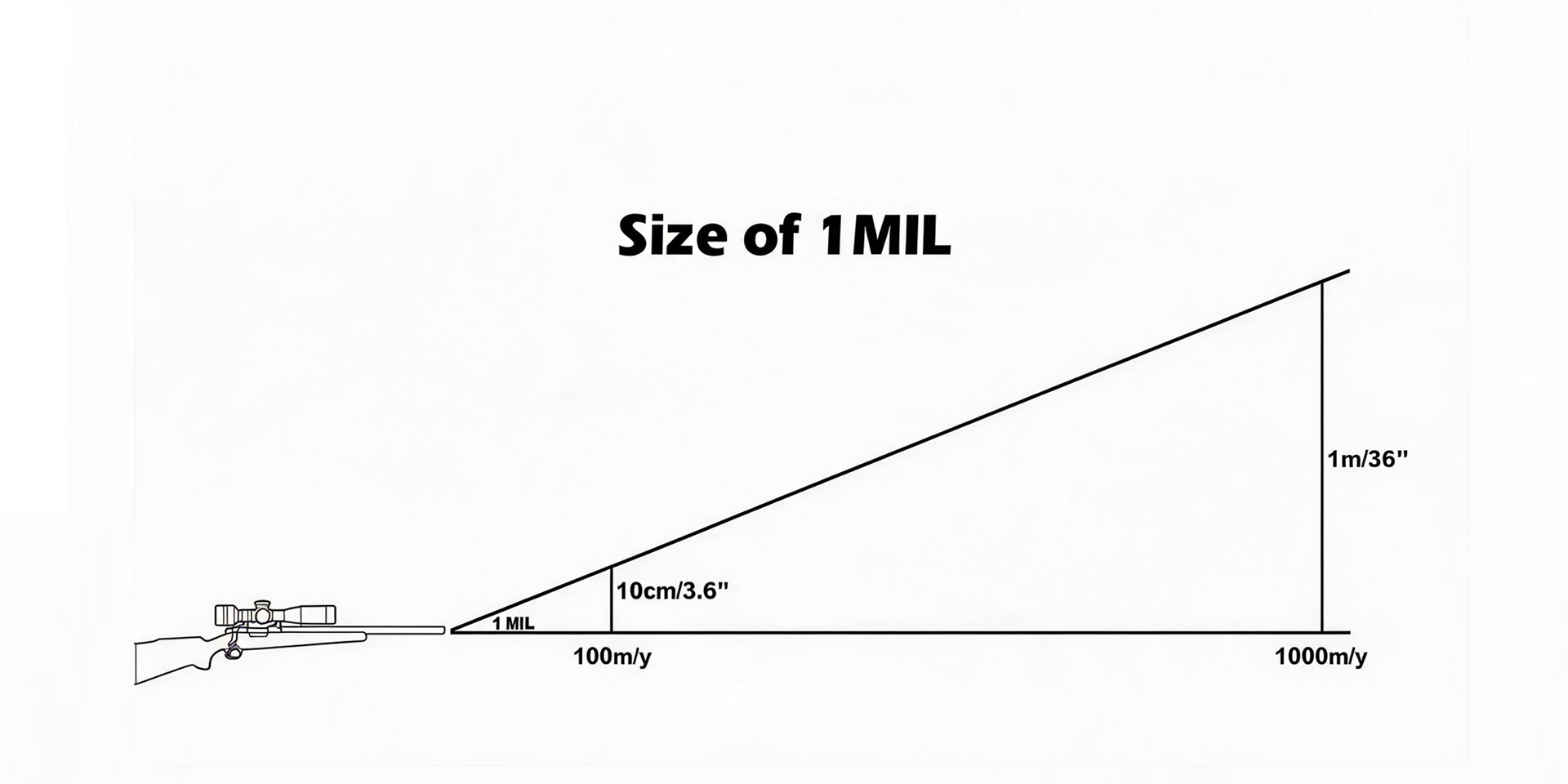
At 100 meters, 1 MIL ≈ 10 centimeters
-
At 100 yards, 1 MIL ≈ 3.6 inches
So, when you adjust a scope by 1 MIL, the point of impact moves approximately:
-
10 cm at 100 meters
-
20 cm at 200 meters
-
50 cm at 500 meters
This simple scaling makes MIL very practical for quick ballistic corrections.
Most MIL scopes use 0.1 MIL per click, which means one click moves the impact point by:
-
1 cm at 100 meters
Modern MIL scopes may also use click values such as:
-
1/5 MIL
-
1/8 MIL
-
1/10 MIL
Among these, 1/10 MIL, or 0.1 MIL, is the most widely used standard. It offers a solid balance between fine adjustment and efficient dialing, which is why it is common on tactical and long-range rifle scopes.
Many shooters like MIL because it keeps long-range scope adjustments straightforward. Once you understand the relationship between MIL, distance, and impact shift, making elevation and windage corrections becomes much faster. Want a deeper explanation of MIL adjustments? Read “MIL vs MOA: How to Use Them.”
1.3 Why Smaller Click Values Give More Precise Adjustments
Click value controls how much the point of impact changes with each turret click. Since turret adjustments are fixed increments, smaller increments allow smaller corrections.
That means:
-
Smaller click value = finer adjustment
-
Larger click value = faster but less detailed adjustment
This matters most in long-range shooting, benchrest shooting, F-Class, and extreme long-range shooting, where a tiny correction can make the difference between a clean hit and a miss.
MOA and MIL are both angular systems, and they can be converted:
-
1 MOA ≈ 0.29 MIL
-
1 MIL ≈ 3.44 MOA
Here is a quick comparison of common click values.
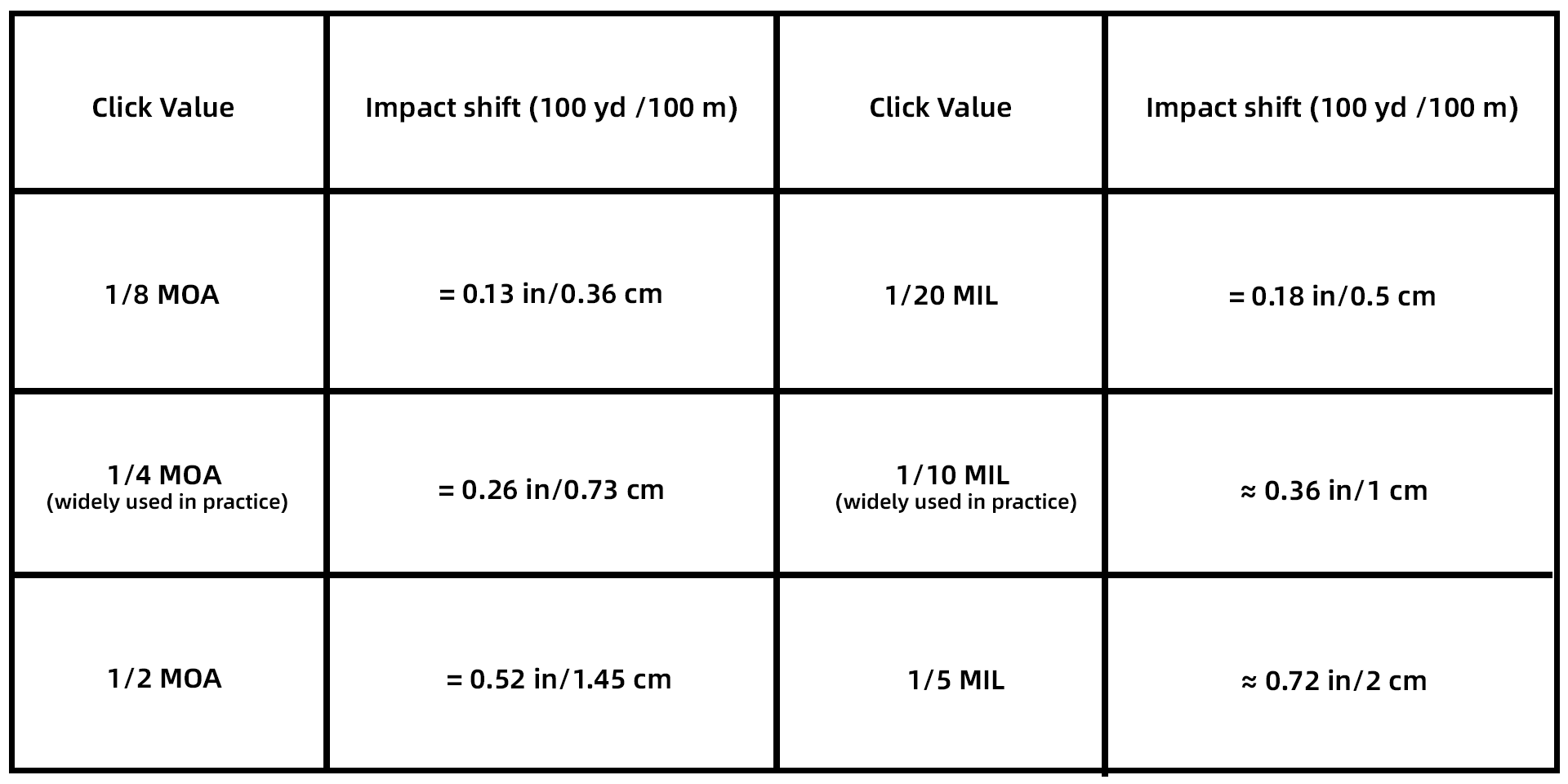
The pattern is clear: the smaller the click value, the smaller the point-of-impact movement per click. This gives shooters more control when adjusting elevation or windage.
Some precision-focused scopes are designed with very fine click values for exactly this reason. For example, the Tauron 5-50×60 ED SFP Long-Range Rifle Scope (SCOL-69) and the Continental x8 6-48×56 ED HPVO MIL SFP Rifle Scope (SCOL-TM52) use 0.05 MIL click values. This allows extremely fine correction, which is especially useful for benchrest, F-Class, and extreme long-range shooting where precision at 1,200 meters and beyond is critical.

2. What Is Adjustment Range on a Rifle Scope?
Adjustment range is the total amount of elevation or windage travel a rifle scope turret can provide. It is usually listed in MOA or MIL.
In a rifle scope specification sheet, you will often see:
-
Elevation Adjustment Range
-
Windage Adjustment Range
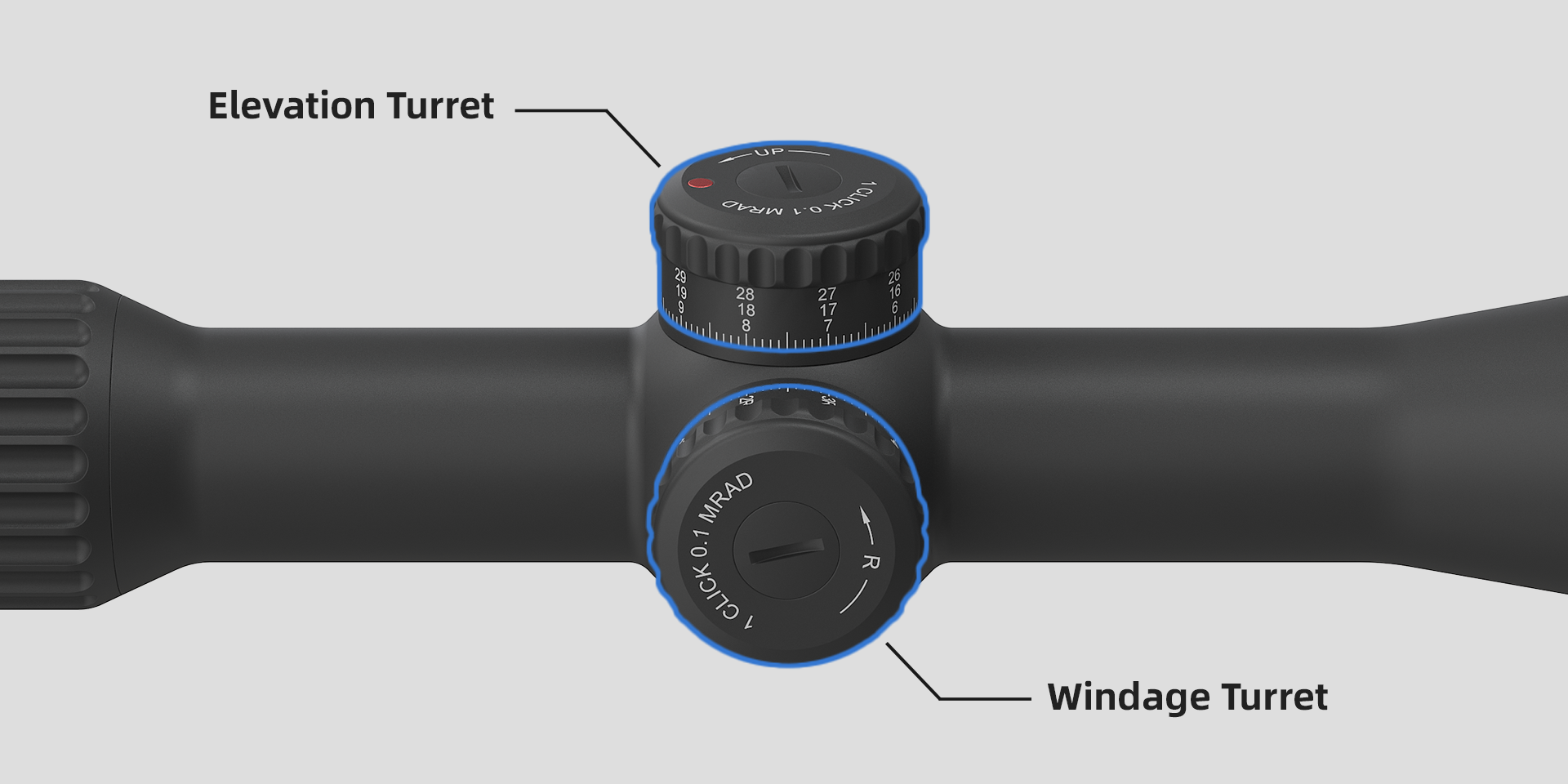
A larger adjustment range gives the shooter more room to compensate for bullet drop, wind drift, and other ballistic factors.
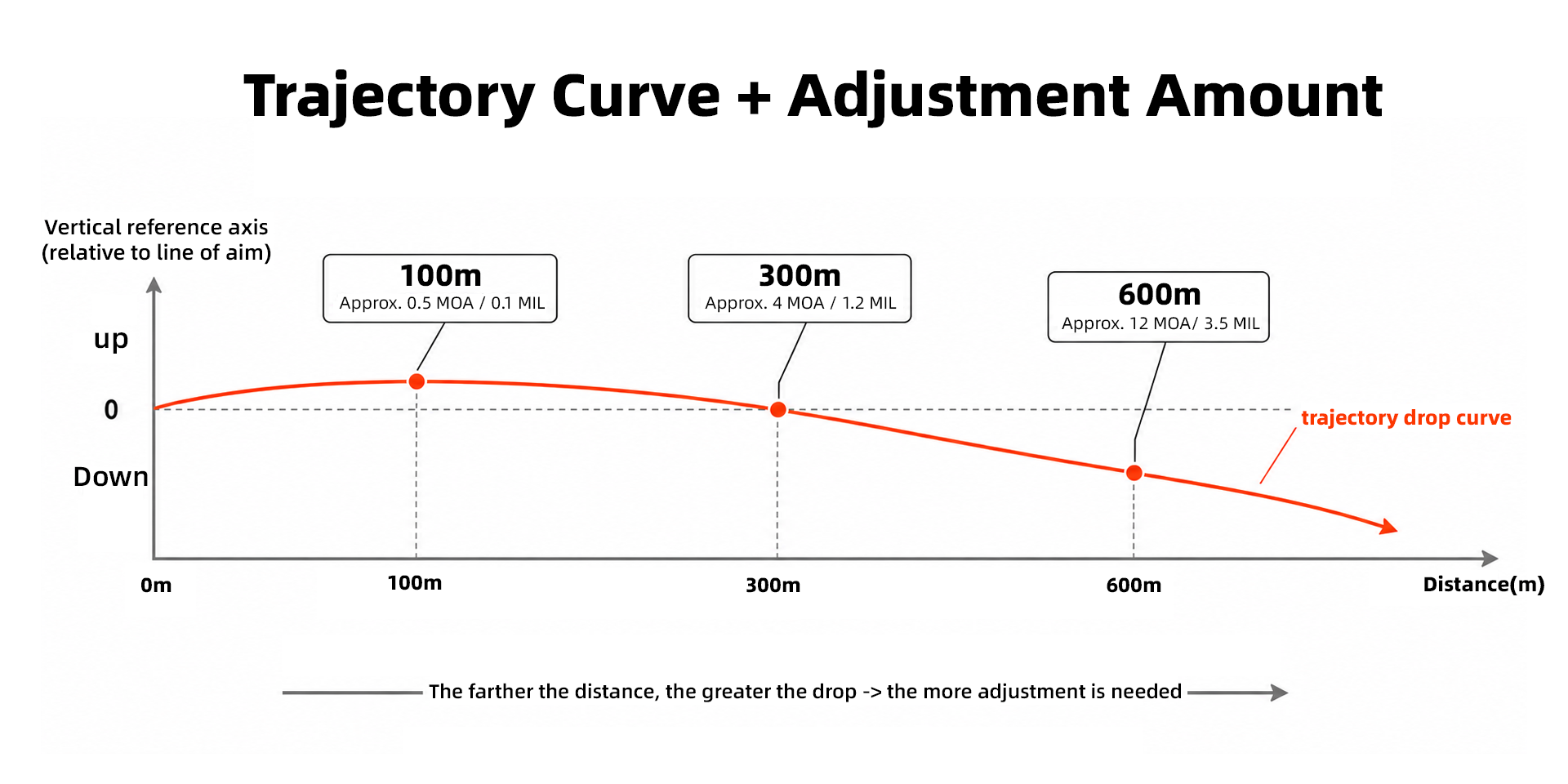
This becomes more important as shooting distance increases. The farther the bullet travels, the more it drops. To stay on target, the shooter must dial elevation upward using the scope turret.
For long-range shooting, a generous elevation adjustment range helps prevent the shooter from running out of turret travel before reaching the required correction.
This idea also applies to airgun shooting. Even at 100 to 200 meters, airgun shooters often pay close attention to elevation adjustment because pellet and slug trajectories can curve dramatically.
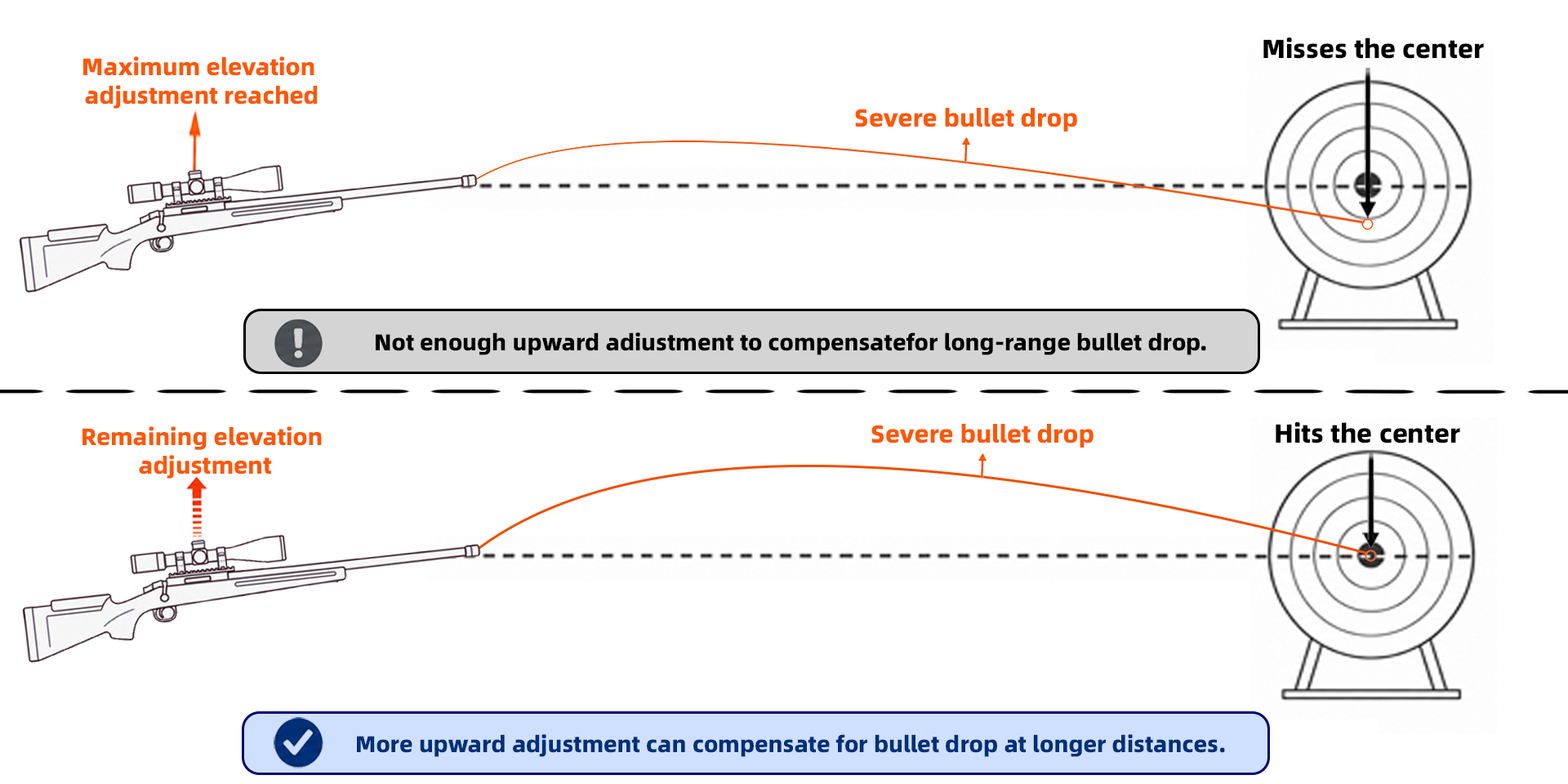
When the scope’s internal adjustment range is not enough, many shooters use an angled scope base, such as a 20 MOA Picatinny mount. For example, the X-ACCU 30mm 1.2" Medium Profile 1-Piece 20MOA Picatinny (XASR-3011) helps extend usable elevation travel for long-distance setups.
In short, more adjustment range gives you more flexibility, especially when shooting farther or using calibers with more noticeable bullet drop.
3. How to Calculate Scope Turret Clicks?
To dial a scope correctly, you need to convert your observed impact error into turret clicks.
The basic process is:
-
Measure how far your shot is from the aiming point.
-
Convert that distance into MOA or MIL.
-
Divide by your scope’s click value.
-
Dial the required number of clicks.
Let’s look at both systems.
3.1 MOA Scope Adjustment Example
Formula
Required Clicks = (Impact Shift ÷ MOA Value at Distance) ÷ Click Value
Scenario
-
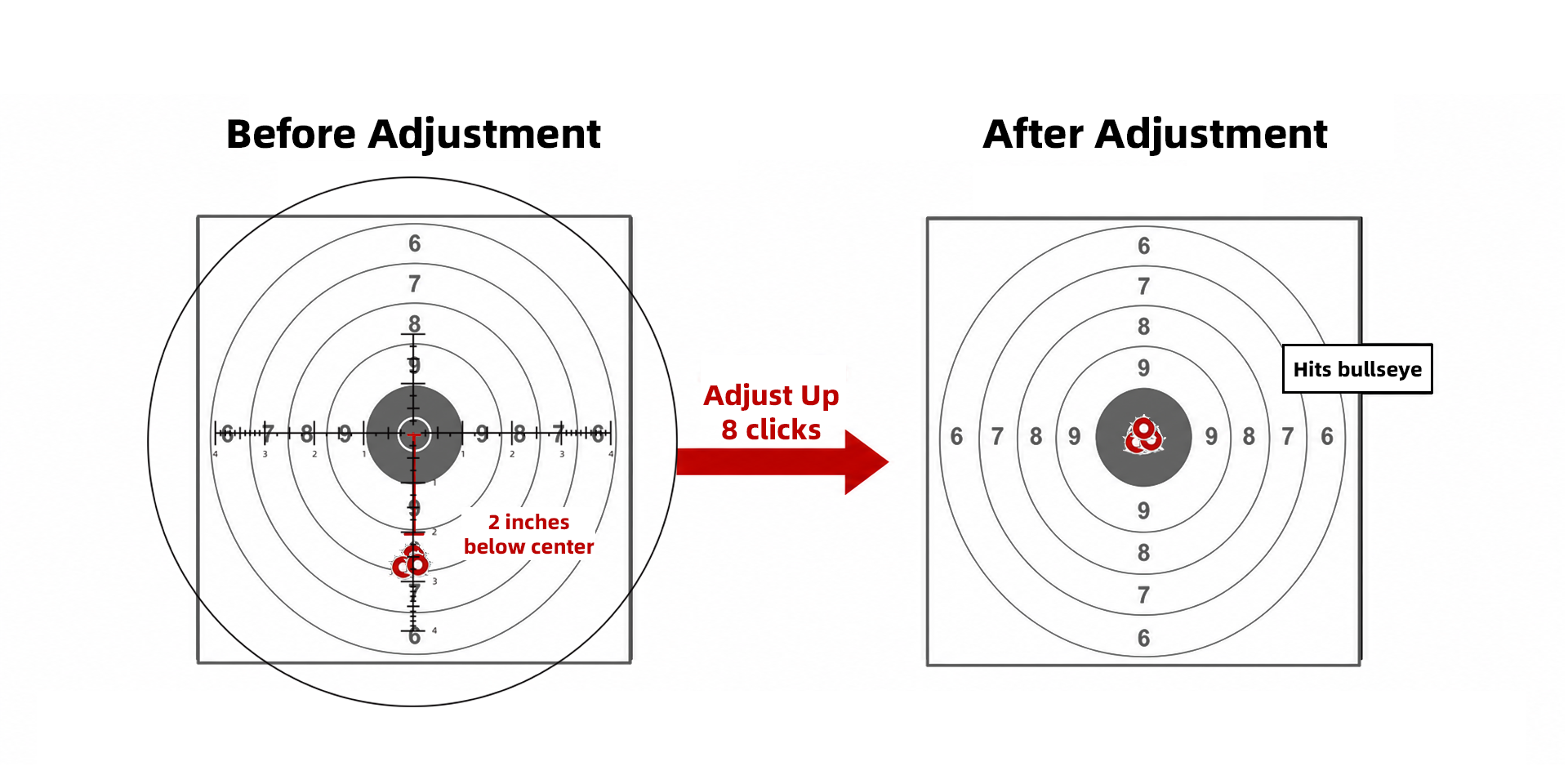
Distance: 100 yards
-
Impact: 2 inches low
-
Scope click value: 1/4 MOA per click
Step 1: Convert inches to MOA
At 100 yards:
-
1 MOA ≈ 1 inch
The impact is 2 inches low:
-
2 ÷ 1 = 2 MOA
So, the shooter needs about 2 MOA of correction.
Step 2: Convert MOA to clicks
Each click equals 0.25 MOA:
-
2 ÷ 0.25 = 8 clicks
Result
Dial 8 clicks up on the elevation turret to move the point of impact onto the target.
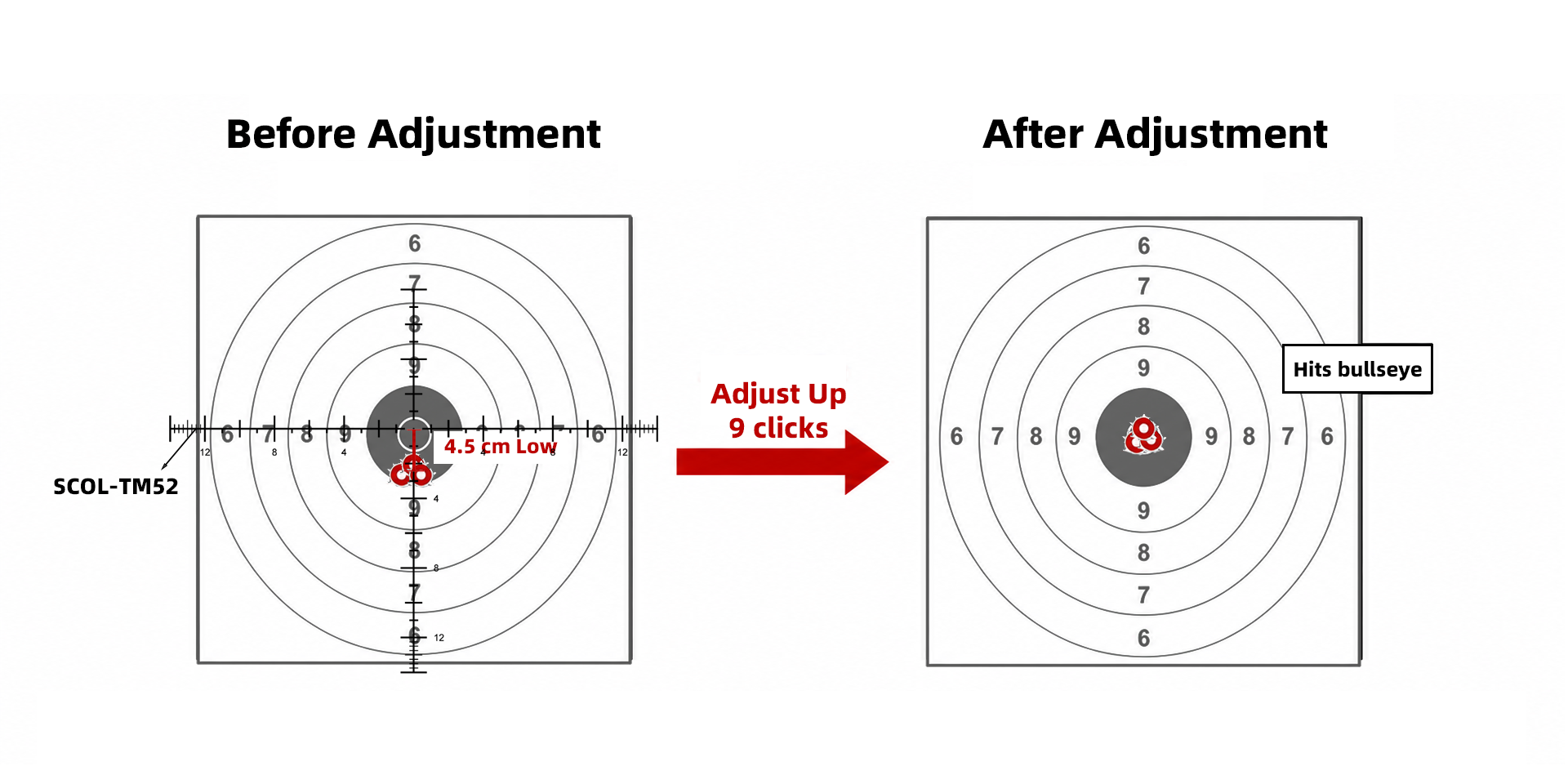
3.2 MIL Scope Adjustment Example
Formula
Required Clicks = (Impact Shift ÷ MIL Value at Distance) ÷ Click Value
Scenario
-
Distance: 100 meters
-
Impact: 4.5 cm low
-
Scope click value: 0.1 MIL per click
Step 1: Convert impact shift to MIL
At 100 meters:
-
1 MIL ≈ 10 cm
The impact is 4.5 cm low:
-
4.5 ÷ 10 = 0.45 MIL
So, the shooter needs 0.45 MIL of correction.
Step 2: Convert MIL to clicks
Each click equals 0.1 MIL:
-
0.45 ÷ 0.1 = 4.5 clicks
Since turrets move in fixed clicks, you need to round to the nearest whole click. In this case, the shooter would dial 4 or 5 clicks, depending on the desired correction.
Now compare that with a finer turret.
If the scope uses 0.05 MIL per click, then:
-
0.45 ÷ 0.05 = 9 clicks
This shows why smaller click values allow more detailed corrections. Instead of choosing between 4 and 5 clicks, the shooter gets a finer adjustment scale.
Need more details? Check our guide “How to Sight in Your Rifle Scope”
4. Conclusion
Click value and adjustment range are two key specs that directly affect how confidently a shooter can control point of impact.
Click value tells you how much each turret click moves the impact point. Smaller click values allow finer corrections, which is especially useful in precision and long-range shooting.
Adjustment range tells you how much total elevation or windage travel your scope can provide. A larger range gives you more room to compensate for bullet drop and environmental factors at extended distances.
Whether you use MOA or MIL scope adjustments, understanding these basics will help you zero your rifle more efficiently, dial elevation with confidence, and make smarter corrections shot after shot.
With the right technique and a well-built rifle scope, turret adjustments become more than just numbers on a dial. They become one of your best tools for consistent shooting accuracy.
FAQ
1. Do suppressors change point of impact?
Yes. Adding a suppressor can change the point of impact because it adds weight to the barrel and can affect barrel harmonics. The shift is usually small and repeatable, so many shooters simply re-zero the rifle with the suppressor installed.
2. Can you use an MOA red dot to estimate range?
Yes, but only as a rough estimate. Since MOA is an angular measurement, an MOA-based red dot can help estimate distance if you already know the target size. However, it is not as precise as a dedicated ranging reticle or laser rangefinder.
3. How do you set eye relief on a rifle scope?
To set eye relief, shoulder the rifle in your normal shooting position and move the scope forward or backward until you see a full, clear image with no dark shadow around the edges. Once the image is comfortable and consistent, secure the scope in place.
Best Sellers